
Last updated on
Nov 6, 2026
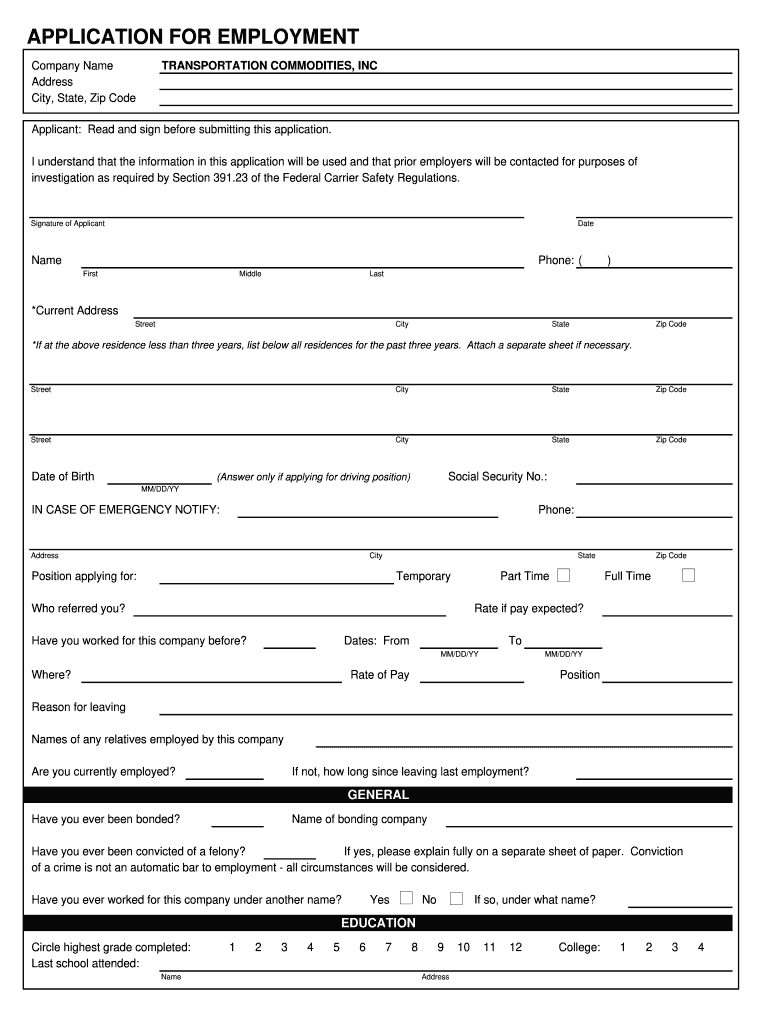
TCI Transportation Commodities Application for Employment 2005-2026 free printable template
pdfFiller is not affiliated with any government organization

Fill out
Complete the form online in a simple drag-and-drop editor.

eSign
Add your legally binding signature or send the form for signing.

Share
Share the form via a link, letting anyone fill it out from any device.

Export
Download, print, email, or move the form to your cloud storage.
Why pdfFiller is the best tool for your documents and forms


End-to-end document management
From editing and signing to collaboration and tracking, pdfFiller has everything you need to get your documents done quickly and efficiently.
Accessible from anywhere
pdfFiller is fully cloud-based. This means you can edit, sign, and share documents from anywhere using your computer, smartphone, or tablet.
Secure and compliant
pdfFiller lets you securely manage documents following global laws like ESIGN, CCPA, and GDPR. It's also HIPAA and SOC 2 compliant.
What is TCI Transportation Commodities Application for Employment
The Application for Employment is a legal document used by Transportation Commodities, Inc. to collect vital information from job applicants for employment consideration.
pdfFiller scores top ratings on review platforms




Easy program to use. Keeps all my files and I can use it anywhere I want.
THANKFUL - IT HELPED ME LAST MINUTE ON FORMS I NEEDED
Who needs TCI Transportation Commodities Application for Employment?
Explore how professionals across industries use pdfFiller.

TCI Transportation Commodities Application for Employment is needed by:
-
Job seekers looking to apply for positions at Transportation Commodities, Inc.
-
HR professionals screening candidates for employment opportunities.
-
Recruiters searching for talent in the transportation industry.
-
Individuals needing a structured format to present their employment history.
-
Students or recent graduates seeking their first job in transportation.
-
Career changers transitioning into roles within the transportation sector.
Comprehensive Guide to TCI Transportation Commodities Application for Employment
What is the Application for Employment?
The Application for Employment form serves as a vital tool for collecting applicant data within Transportation Commodities, Inc. It is designed to systematically gather essential information, such as personal details and employment history. The form mandates applicant signatures, ensuring accountability and consent. This standardized application format fosters consistency and facilitates the hiring process.
This employment application template is crucial for those seeking positions in the transportation sector.
Purpose and Benefits of the Application for Employment
The Application for Employment is pivotal for accurately gathering personal information and work history from applicants. By utilizing this form, organizations streamline their recruitment methodologies, making it easier to compare candidates. Furthermore, the standardized approach enables the inclusion of legal disclaimers and state-specific requirements, ensuring compliance throughout the application process.
-
Standardizes the job application procedure.
-
Facilitates quicker processing of applications.
-
Ensures collection of crucial employment-related data.
Key Features of the Application for Employment
This application encompasses various fields and checkboxes tailored to elicit detailed responses from applicants. Key components include sections for maintenance, clerical, and driving experiences, along with obligatory signature requirements. Additionally, background investigation clauses are integrated into the document, highlighting the importance of thorough vetting in the hiring process.
-
Detailed fields for personal and employment history.
-
Experience inquiries specific to job roles.
-
Legal disclaimers relevant to each state.
Eligibility Criteria for the Application for Employment
The eligibility to use this application primarily targets individuals pursuing opportunities in the transportation field. Applicants are generally required to provide personal demographic information, such as their date of birth, particularly for driving positions. The form also guides non-eligible users in recognizing their ineligibility.
-
Must be of legal working age.
-
Specific demographic information may be necessary for certain positions.
How to Fill Out the Application for Employment Online
Navigating the online filling process for the Application for Employment is straightforward. Begin by accessing the form through the pdfFiller platform, and follow these simple steps:
-
Input personal information in the designated fields.
-
Complete the employment history section, ensuring accuracy.
-
Review your entries for correctness before submission.
Optional fields may be available, but it’s crucial to fill out all required information accurately before submitting the application.
Common Errors and How to Avoid Them
Applicants often encounter pitfalls when completing the Application for Employment. To mitigate these common errors, consider the following tips:
-
Double-check personal information for accuracy.
-
Ensure all required fields are completed before submission.
Reviewing the application multiple times can help identify and resolve errors, preventing delays in processing.
Submission Methods for the Application for Employment
Once the Application for Employment is complete, users have several submission options. This includes online submission through the pdfFiller platform, which offers a seamless experience. Additionally, alternatives such as printing, mailing, or faxing are available.
-
Online submission through pdfFiller.
-
Alternative methods: mailing or faxing the application.
Be aware of any deadline information and processing times relevant to your method of submission.
What Happens After You Submit the Application for Employment?
Post-submission, the employer initiates the application review process. Applicants can expect notifications regarding the status of their application shortly after submission. Understanding common rejection reasons may aid applicants in refining future submissions, and knowing how to navigate post-rejection steps can be beneficial.
-
Monitoring application status regularly.
-
Recognizing potential reasons for rejection to improve future applications.
How pdfFiller Can Simplify Your Application Process
pdfFiller is equipped with features that streamline the filling out of the Application for Employment. Its capabilities include creating fillable forms and eSigning, making the overall process efficient and user-friendly. Security is prioritized, ensuring compliance with data protection laws.
User testimonials highlight the effectiveness of pdfFiller in facilitating job applications, reinforcing its role as a valuable tool in the hiring process.
Ready to Get Started? Simplify Your Job Application with pdfFiller!
Access the Application for Employment through pdfFiller and experience the ease of editing and submitting documents online. By leveraging pdfFiller's features, applicants can enhance their chances for successful job applications.
How to fill out the TCI Transportation Commodities Application for Employment
-
1.To access the Application for Employment form on pdfFiller, type the form's name in the pdfFiller search bar and select it from the results.
-
2.Open the form and explore the interface with clearly labeled fields, checkboxes, and instructions specific to job applicants.
-
3.Before starting, gather necessary information such as your personal details, employment history, education credentials, and references to fill out the form accurately.
-
4.Begin by entering your name, contact information, and the position you're applying for in the designated fields.
-
5.Fill in your educational background and work experience, ensuring you provide accurate dates and descriptions of your responsibilities.
-
6.If applying for a driving position, include necessary driving experience and relevant certifications in the specified section.
-
7.Make sure to review all filled sections for completeness and accuracy to avoid any missing information.
-
8.Before finalizing the form, ensure to read through the instructions and disclaimers provided for state-specific requirements.
-
9.Once all fields are complete, check the 'Signature of Applicant' section and draw your signature using the signature tool provided.
-
10.Save your work on pdfFiller, and follow the prompts to download a copy of the completed form or submit it directly to Transportation Commodities, Inc.

What are the eligibility requirements for using the Application for Employment?
To use the Application for Employment, you must be seeking a job with Transportation Commodities, Inc. and be at least 18 years old. Ensure to provide accurate personal information and work history as required.
Is there a deadline for submitting the Application for Employment?
While specific submission deadlines may vary, it is recommended to apply as soon as job openings are announced. Staying updated on application timelines helps in securing timely employment opportunities.
How can I submit the completed Application for Employment?
You can submit the completed Application for Employment either through pdfFiller's submission feature or by downloading it and sending it via email or traditional mail to Transportation Commodities, Inc. Check submission guidelines for preferred methods.
What supporting documents do I need to submit with my application?
Typically, you may be required to submit documents such as a resume, cover letter, and any relevant certificates or licenses, especially if applying for specific positions involving driving or specialized skills.
What common mistakes should I avoid when filling out the application?
To avoid errors, ensure that all information is accurate and completely filled out. Double-check for typos, especially in your contact information, and make sure to sign the application if required.
How long does it take to process the Application for Employment?
Processing times for the Application for Employment may vary depending on the number of applicants. Typically, you can expect to hear back within a few weeks after submission, but this may vary based on company procedures.
What if I have questions while filling out the application?
If you encounter any questions while completing the Application for Employment, you can consult the provided instructions within the form. Additionally, you may contact Transportation Commodities, Inc. directly for assistance.
Related Content
Related Forms





Related Catalogs
Get the latest insights from our blog


If you believe that this page should be taken down, please follow our DMCA take down process
here
.
This form may include fields for payment information. Data entered in these fields is not covered by PCI DSS compliance.